2007年10月10日

Vint Cerf 訪問台灣

Vint Cerf 是誰?他要訪問台灣有什麼大不了的?

如果你不用網路,那你不用知道 Vint Cerf 是誰,不過我就很好奇你是如何看到這篇文章的。

如果你用網路但對於未來沒有想像力,那你不用知道 Vint Cerf 是誰。

如果你對於未來的網路對人類的影響充滿了好奇與想像,那你該找個機會聽聽 Vint Cerf 的演講。

Vint Cerf 在 1970 年代和 Robert Kahn 共同設計了(或說發明了) TCP 和 IP 這兩個網路協定。對現代網路技術有點接觸的人都知道,網際網路(internet)就是架構在 IP 加上 TCP 或 UDP 的協定上,所以有人把 Vint Cerf 冠上「網際網路之父」的尊稱。只是這樣一來我就不曉得 Robert Kahn 要怎麼尊稱了...

Vint Cerf 現在是 Google 的 Chief Internet Evangelist(網際網路傳教長?) XD,這次來台灣除了 Google 內部的事情之外,還將在 TANET 舉辦的台灣網際網路研討會給一場公開演講: Tracking the Internet into the 21st Century,只要事先報名就能參加,免報名費。 Google Taiwan 也將趁這個機會,接在 Vint Cerf 演講之後辦一場介紹 Google 新產品的活動,一樣免費報名。

以下是演講公告。

前言

「網路」已成為現代人不可或缺的生活工具及個人獲取資訊的主要管道,企業的行銷利器,同時也是創作者的樂土。網路科技日新月異,每一階段的技術創新都帶來嶄新商業模式與更便利的生活方式。掌握網路發展趨勢更是網路時代創造機會的關鍵。想瞭解網路的未來發展嗎?Google誠摯邀請您與「網際網路之父」Vint Cerf 博士一起探索二十一世紀網路趨勢,同時讓 Google 台灣工程研究所團隊與您分享Google 技術創新,一起感受網路新生活。

講者簡介

Vint Cerf 博士目前擔任 Google 公司資深副總裁兼首席網際網路專家,負責評估新創網路技術,支援 Google 創新技術及開發網際網路先進產品和服務,是 Google 公司在網際網路世界中最重要的代表人物。

Cerf 博士被尊為"網際網路之父",也是 TCP/IP 協定和網際網路架構設計者之一。Vint Cerf 博士曾擔任網際網路名稱與位址號碼分配組織(ICANN)的理事長及 IPv6 論壇的名譽主席,為網際網路發展的重要推手。《People》雜誌將 Cerf 博士選為當年「25個最令人著迷的人物」之一,同時是 2004 年電腦科學界諾貝爾獎 Turing Award 得主。

Google 台灣工程研究所於 2006 年 4 月成立,致力發展尖端網路技術。本次演講為研發團隊成立以來首次公開研發成果展示。

詳細議程

  • 講題:探索二十一世紀網路趨勢 (英語演講)
    Tracking the Internet into the 21st Century
  • 時間:10 月 22 日14:30 ~ 15:30 (名額有限,14:00 開始入場)
  • 地點:福華文教會館前瞻廳 (台北市新生南路三段三十號)
  • 講者:Vint Cerf 博士,2004 年電腦諾貝爾獎 Turing Award 得主,Google 資深副總裁
  • 主持人:李琳山博士,台灣大學教授
  • 共同主辦:台灣大學與台灣學術網路會議 (TANET 2007)

  • 講題:Google 技術創新與網路生活
  • 時間:10 月 22 日15:40 ~ 16:40
  • 地點:福華文教會館前瞻廳 (台北市新生南路三段三十號)
  • 講者:Google 台灣工程研究所團隊

本次演講免費參加,因現場座位有限,請儘早報名。
報名網址:http://tanet2007.ntu.edu.tw/VintonCerf/r.htm

2007年10月9日

無名的 robots.txt 消失了

(先聲明:我是 Google Taiwan 的小小工程師,但本文是我個人的想法,和 Google 公司無關)

上個禮拜 (2007/9/30) ijliao 的部落格文章 Yahoo! + 無名小站 濫用市場地位、排除其他搜尋引擎 ? 引發了一連串的討論,包括 xditeGea-Suan Lin永遠的真田幸村等部落格也提供了不少資訊和意見。

在昨天 (2007/10/08) 媒體 CNET 報導這件事之前,無名的 robots.txt 一直沒變,但今天 robots.txt 無預警地消失了,要抓它會拿到 "404 Not Found" 的錯誤訊息,根據 A Standard for Robot Exclusion 規格書,沒有 robots.txt 就表示任何 robot 都可以到這個網站的任何地方去爬,無名真可算是 180 度大轉彎。

想知道無名之前是何時關上大門的話,可以參考《Google 網站管理員工具》裡 Googlebot 的記錄 (需要有 Google 帳號),抓圖如下:

Googlebot 上次成功爬到無名的內容是 8 月 23 日,所以無名其實惦惦呷三碗公老早就已經把 Yahoo! 以外的搜尋引擎拒在門外了。

當然無名會這麼做並不令人驚訝,畢竟無名現在是 Yahoo! 的,而 Yahoo! 的知識+ 把別的搜尋引擎擋在門外早就不是新聞了。我比較好奇的是,把自己辛辛苦苦寫的網誌或知識放在一個不准別家搜尋引擎去看的網站,真的值得嗎?

整個網際網路遠遠大於任何單一網站或搜尋引擎,如果我寫的東西放在一個隨時可能不准守規矩的搜尋引擎來看的網站,那代表兩件事:


  1. 我在獎賞不守規矩的搜尋引擎

    嗯,我不知道別人怎麼想,但讓不守規矩的壞小孩有糖吃?這不是任何合理的人會做的事。

  2. 我在鼓勵商業公司不當使用產品優勢

    無名是目前台灣人氣最旺的部落格和照片網站,不允許其他搜尋引擎來看無名的內容,對於不知內情的網民而言,顯然會覺得雅虎奇摩的搜尋結果比較好,這是利用產品 A 的優勢拉抬不同領域的產品 B 的行為,就像當年微軟利用 Windows 作業系統的優勢綑綁 IE 瀏覽器來打敗 Netscape 一樣...

在今天這個時間點,無名已經把這個備受爭議的 robots.txt 刪除了。我相信經歷這次部落客的批評和媒體的報導,無名應該不會再犯眾怒做出同樣的事了。但是雅虎奇摩的知識+仍然在精英俱樂部裡,何時雅虎奇摩才會像 Wikipedia 那樣大氣度呢?

2006年8月9日

Fiber to my home

The company Extra-LAN is the first one that offers last mile fiber connection to any household within its area of opeation. The largest ISP in Taiwan, hinet.net, only offers so-called "hi-building" for selected apartment buildings. Since hinet.net enjoys a monopoly in Taiwan for it semi-governmental status, I certainly don't want to let them earn any money from me.

So I ordered a 2 Mbps fiber subscription from Extra-LAN. It costs NT$599/month, which is significantly lower than ADSL with 2Mbps/128kbps download/upload speed. And it should be symmetric 2 Mbps. :-)

The hardware

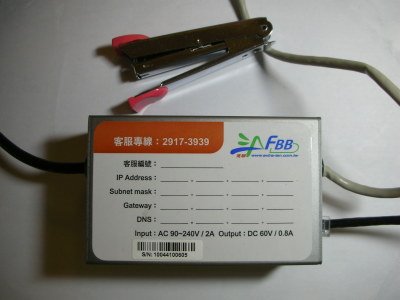
Two technicians come to my apartment and it took them less than an hour to get the "ethernet wire" from downstairs to my apartment unit at 14F. It seems the "ethernet wire" they use in the cable tunnel is not the usual one otherwise anyone can just open up the access door and connect to it without paying anything. They used an FBB box to "convert" the signals to normal ethernet ones. See the photo below.

Configuration

Setting up my iMac (G4 1 GHz) for direct connection is a breeze. Just type in the IP address, netmask, gateway and name server settings and it worked out of box. Setting up my wireless access point (AP) isn't much harder, either. It is a matter of connecting the box to the AP then the AP to iMac through a fast ethernet hub. Copying all the settings to the AP and re-configuring my iMac for DHCP are all that's needed.

Test ride

I use a 22MB file for speed tests. Downloading it from the academic network in Taiwan takes 1'43", or 227 kB/s. That's nearly the wire speed!
Uploading, however, is much slower from my iMac. It is a miserable 10 kB/s.

I tried again with my new ThinkPad X41. It reached the same download speed but the upload speed is much faster, around 100 kB/s.

I called the customer service and they quickly pointed out that it requires a network card with 802.3x capability to reach full upload speed. And the guy said that most modern network cards support 802.3x.

Without knowing exactly what 802.3x means, I tried to isolate the problem. Since the X41 is new, first I connected it directly to the FBB box and, viola! Both upload and download are at ~ 230 kB/s. That excluded X41 as the guilty party. Next I connected the old iMac directly to the FBB box. Well, it is somewhat shaky. The upload can reach wire speed but the fluctuation is large. In the end the average is about 170 kB/s. Still much better than 10 kB/s!

Now I have to point my finger to the hub, which is a PCI FX-05EA. After checking the manual, indeed 802.3x is NOT listed as a supported standard.

Conclusion

My conclusion is: both the old iMac and the new X41 work well, but I need to find a hub which support 802.3x! A web search shows that an 8-port fast-ethernet hub with 802.3x capability costs around NT$700. Sounds good! I think I'll buy one soon.